
Tool version: O!kurra Capital Defense EA 2.05
A binding distinction — read it before you go any further. In O!kurra the word “Movement” already has a meaning: it is travel of the OKUR oscillator, measured in oscillator units, which produces a button’s entry signal (Movement Correction and Movement Continuation, chapter 9). Price Movement is something else — travel of the price, measured in points or in ATR multiples. You will see both terms side by side in the button panel. “Movement” asks how far the indicator travelled. “Price Movement” asks how far the price travelled.
18.1 What Price Movement is
Until now you switched buttons on and off in three ways: by hand on the panel, through Follow BEa (chapter 12), or through Cross-button Triggers (chapter 17). All three react to the state of the system — your click, the shield arming, another button changing state.
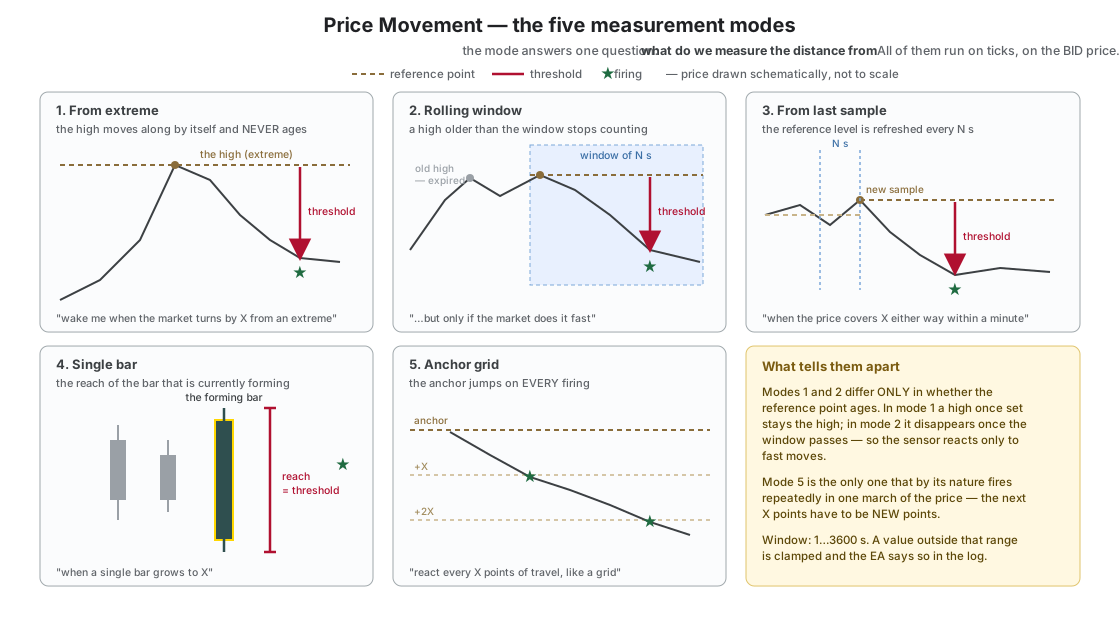
Price Movement adds a fourth way: reacting to price travel itself. Four independent sensors measure how far the price has gone and, once it covers a set distance, they switch the subscribed buttons on or off.
This is not a filter. A filter (chapter 10) answers the question “is it allowed to enter right now” and works on a button that is already on. A sensor answers a different question: “should this strategy be in play at all”. A filter passes or blocks a signal; a sensor throws a switch.
Three things worth knowing straight away:
- Measurement runs on ticks, on the BID price. Not on closed bars — a sensor fires the moment the distance is covered, not at the end of the minute. A bar is only one of five measurement modes, not a rule for the whole family. BID rather than ASK, because a widening spread would look like price travel that never happened.
- Factory-wise the whole family is disabled twice over: since release 2.00 the master switch (
PM_Enabled, section 18.11) ships disabled, and independently of it all four sensors have their measurement mode set to “Off”. The family does nothing until you deliberately turn on the master switch and set a measurement mode on one of the sensors. - A sensor does not name its targets. It is the button that says which sensor switches it on and which switches it off — see the next section.
18.2 The model: the button subscribes to the sensor
The most important design decision in this family: a sensor has no target list. The sensor’s parameters are shared, and every button declares for itself which sensor it uses — exactly the way it opts into the global filters (chapter 10).
Every button has two fields:
| Field | Meaning | Values |
|---|---|---|
B<n>_PM_ArmBy | which sensor switches me on | 0 = none, 1…4 = sensor number |
B<n>_PM_DisarmBy | which sensor switches me off | 0 = none, 1…4 = sensor number |
In prose: the “switched ON by sensor” field says which of the four sensors should wake this button, and the “switched OFF by sensor” field says which one should put it to sleep. Zero in both fields means the button takes no part in Price Movement at all. That is the factory setting on all five buttons.