Tool version: O!kurra Capital Defense EA 2.05
10.1 What filters are and why to use them
The OKUR engine (chapter 9) generates a signal when the oscillator meets the zone and trigger conditions. The engine itself does not look at the broader context — it does not know whether we are in an uptrend or a downtrend, whether price is at an important support level, or whether a higher timeframe confirms the direction. It only looks at its own timeframe and its own thresholds.
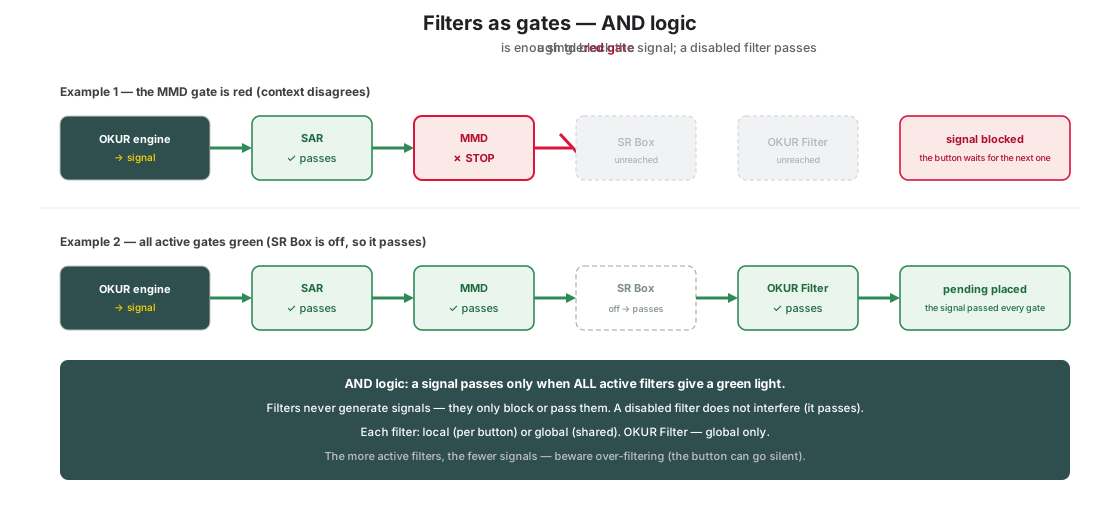
Filters are a layer of additional selection, operating between the generation of a signal and the placement of a pending order. Each filter answers the question: “does the broader market context agree with the button’s direction?” If yes — the signal passes. If not — the signal is blocked and the button patiently waits for the next one.
A filter is not the same thing as a price-travel sensor. It is worth separating the two straight away, because both “react to the market” yet do different jobs. A filter works on a button that is already on and decides about a single signal: pass it or block it. A Price Movement sensor (chapter 18) does not look at signals at all — it throws the switch of the whole button, deciding whether that strategy is in play. A filter answers “is it allowed to enter right now”, a sensor answers “should this strategy be working at all today”. You can use both together: the sensor wakes the button, and the filters still decide about each of its signals individually.
O!kurra has four kinds of filters, each looking from a different perspective:
- SAR Filter — the short/medium-term trend through the eyes of the classic Parabolic SAR.
- MMD Clouds Filter — trend structure through the eyes of the MMD methodology (six moving averages).
- SR Box Filter — proximity to important support/resistance levels.
- OKUR Filter — directional bias from a second, independent instance of the OKUR oscillator (typically on a higher timeframe).
Where each filter lives. SAR, MMD Clouds and SR Box can be set separately in each button (the local version) or globally (shared across the whole EA). The OKUR Filter is global only — inside a button the OKUR oscillator plays the role of the signal engine (chapter 9), not of a filter. So a single button has three filters of its own (SAR/MMD/SR) and can additionally hook into the global filters, including OKUR (details in section 10.2).
The key rule: filters do not generate signals. They only block them or let them through. A filter can never open a trade by itself or place a pending order either — even a full set of green gates opens nothing until the OKUR engine generates a signal. Without filters, a signal from the OKUR engine passes freely. With filters, it hits gates. By default (“All”) a pending order is placed only when all active gates give a green light — classic AND logic. As of release 1.28 the button has a choice, though: the Filters Mode field can switch its three own filters into “Any” mode — one green light is enough. The full rules of both modes — section 10.7.