Educational positioning (applies to the entire Addendum): Okurra is a purely educational tool for analyzing price behavior. The Creator helps you parameterize that tool — it does not create an “investment set” and it does not give advice. The generated file is meant exclusively for a demo account and the Strategy Tester; using it on a real account is solely at your own risk and responsibility.
1. What the Set Creator is
The Creator is an interactive interview on okurra.com that turns your answers about decisions into a ready .set configuration file for the O!kurra tool. Instead of fighting through hundreds of parameters in the EA settings window, you answer questions asked in plain language — and the Creator assembles them into a complete, technically correct file.
The Creator is the third designer next to the Button and Global indicators: it produces the same kind of .set file, which you then load via F7 or with the Load button in the panel. It does not trade, does not connect to your account, does not make decisions for you — it parameterizes an educational tool according to what you want to observe.
2. Two paths to one file
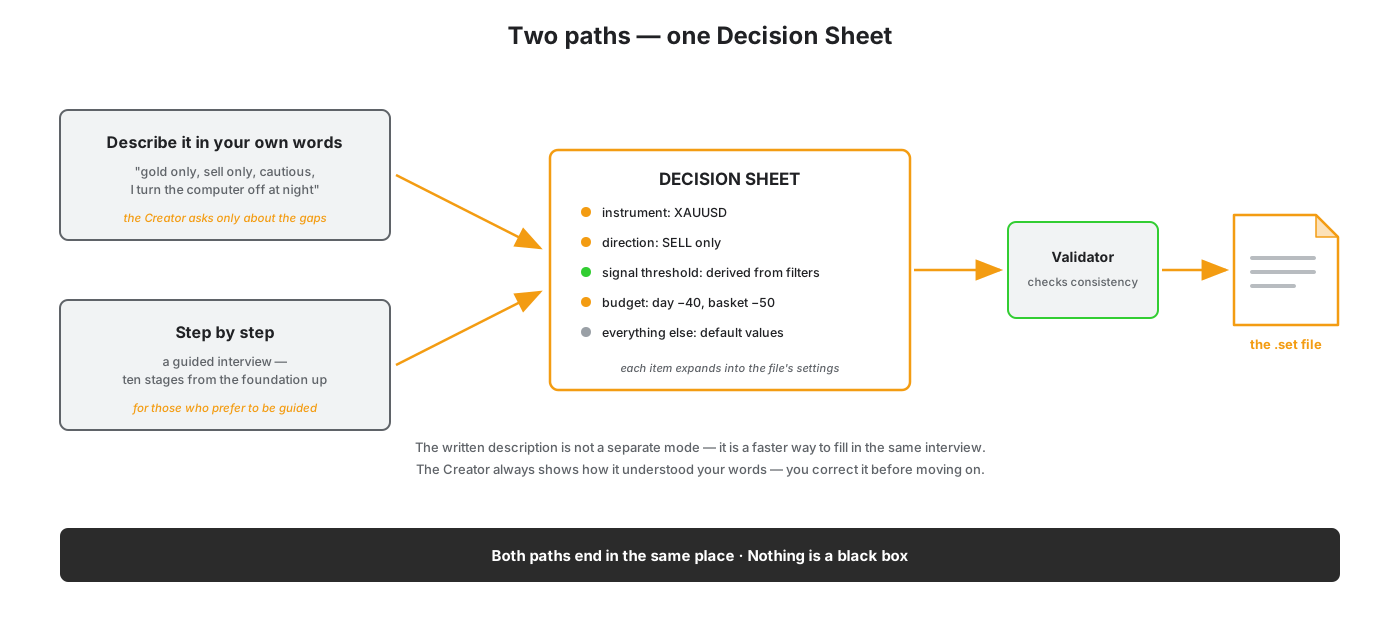
You start the interview by one of two paths — both end in the same place:
- Describe it in your own words. You write naturally what you want to observe (e.g. “gold only, sell only, cautious, I turn the computer off at night”). The Creator translates the description into an initial profile and asks only about what the description did not cover. It always shows how it understood your words — you can correct it before moving on.
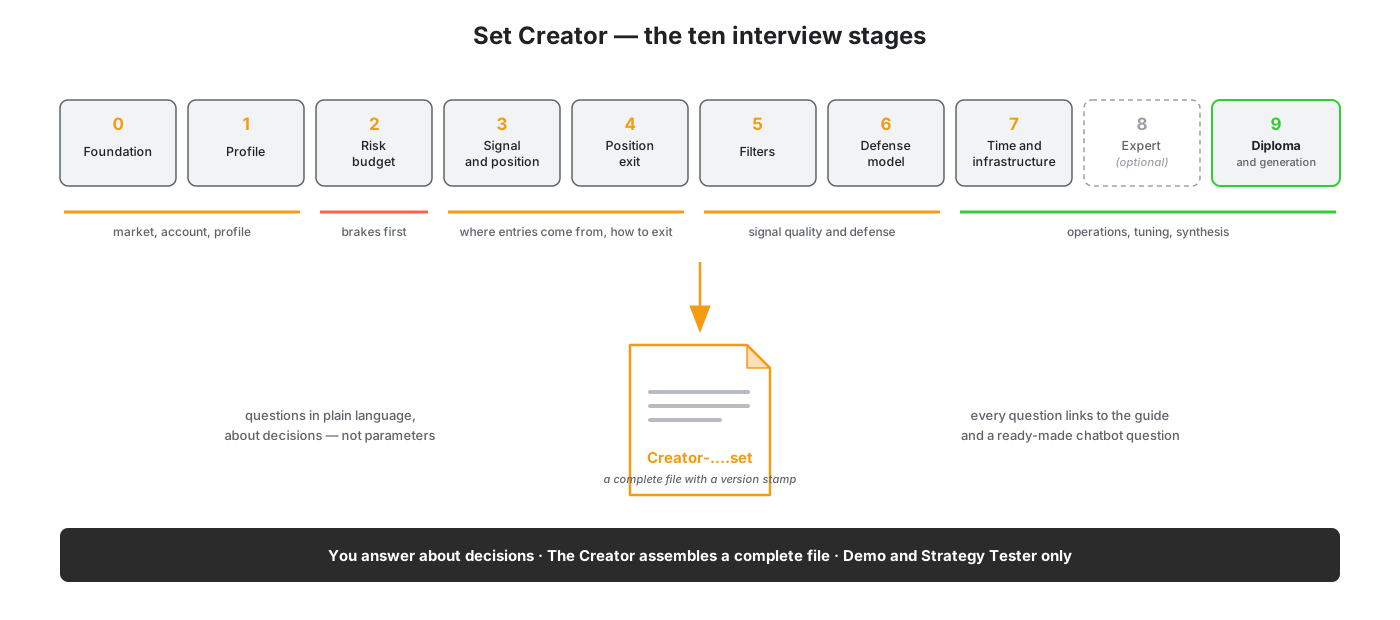
- Guide me step by step. A classic interview guided through ten stages, for those who prefer to be led from the start.
Both paths meet at the Decision Sheet — a screen that shows all your decisions in plain language and lets you expand each one into the specific file settings. In other words: the written description is not a separate, mysterious mode — it is simply a faster way of filling in the same interview.
3. The Decision Sheet — a contract, not a black box
The Decision Sheet is a list of decisions, not parameters. Each item is written in an understandable way (“The BEa shield arms at 22:00 broker time”) and expands into the file settings behind it. The color next to each item tells you where the value came from: your answer, a value derived from your answers, or a default value.
This is deliberate: the hardest and most commonly confused things (signal direction and side, the shield’s arming direction, the units of the limits) the Creator computes itself and only shows the result for your confirmation — it does not make you set them by hand. As a result, an inconsistent combination cannot be assembled by accident.
4. Before you get the file — a consistency check
Before the Creator generates the file, it runs it through a consistency validator. Every rule comes from a real situation someone has already been burned by — the validator does not just block, it explains why and offers a fix. Examples of what it catches: a configuration that would never open a position at all; a grid without a hard loss floor; an inconsistent “night package” (the shield hour drifted apart from the server-stop window).
This is the most educational part: rules that are invisible in a flat list of settings become a “why” message at the very moment you make the mistake.
5. The diploma — what your set covers, and what it does not
At the end you receive a map of twelve layers (the same ones the Lessons course teaches): which risk layer is active in your set, and which one you deliberately leave uncovered. It gives you a language for further learning and for talking to the chatbot — you know not only what your set contains, but also which risk class you left uncovered, and which lesson closes your next step.
6. The tool’s character — the message in three places
The educational character is not fine print — it is part of the experience. The message appears:
- at the start (you must confirm before you begin),
- on every stage (a permanent bar: “the set is built on our AI’s best knowledge and serves educational and research purposes only”),
- when downloading the file (the confirmation is repeated).
In prose, for clarity: sets from the Creator are intended exclusively for demo accounts and the Strategy Tester. They are not intended for real accounts; if you use them there anyway, you do so solely at your own risk and responsibility. Okurra is an educational tool, not an investment one, and the Creator helps you parameterize that tool — it does not create an “investment set”.
7. What to do with the finished file
- The Strategy Tester first. Load the file and run it in the “every tick based on real ticks” mode (the open-prices model can be an artifact — the set will behave differently than in reality). Observe how the price behaves with your settings — that is the goal.
- Load the set into the Button and Global indicators. This is the best way to see which parameters changed and how they affect the tool’s behavior. The panel shows all the settings; loading in one panel synchronizes the other.
- You download the file to your own disk. We do not store your sets. Downloading the finished file requires an active license for the Button and Global indicators (minimum); you can go through the interview itself without a license. Logged-in users get their interview progress saved, so you can come back later.
In prose: the order is Tester → a look in the panels → (possibly) demo. The Creator guarantees the technical consistency of the file, not the outcome — a set is a skeleton for tuning in the Tester, not a recommendation.
8. Which version your set targets
Every file from the Creator is prepared for a specific tool version (today: O!kurra EA 1.23). The version is written into the file itself (the first line of the configuration comment), shown on the final screen and in the file name. If you have an older EA version, some settings may behave differently — which is why the Tester always comes first. You can read your EA version from the Okurra panel header on the chart or in the EA’s about window.
The file name follows the panel convention: just as Button saves Button_… and Global saves Global_…, the Creator names its files Creator-…. The file is always new — we never overwrite the previous one.