
Tool version: O!kurra Capital Defense EA 2.05
Table of contents
23.1 First steps and installation 23.2 Button configuration and the OKUR engine 23.3 Filters, zones, Target Lines 23.4 BEa and account guardians 23.5 Strategies and scenarios 23.6 Cross-button Triggers 23.7 License and versions 23.8 Safety, demo, live 23.9 The tool’s philosophy
23.1 First steps and installation
Do I need programming knowledge?
No. You configure everything through the design panels (OkurraButton / OkurraGlobal), saving to a .set file and loading it into the EA via F7 (chapter 7) — or manually in Inputs. No code is written.
Does O!kurra work on MT4? No. The whole ecosystem is written in MQL5 and runs exclusively on MetaTrader 5.
Do I need a VPS? It is not required — the tool runs on ordinary Windows. But for 24/7 operation (when you leave the EA unattended) a VPS is strongly recommended: stability, a reliable connection to the broker, no interruptions from restarts or power loss.
Which instrument for a first test? Gold (XAUUSD) — the starting values in the scenarios are calibrated for it (chapter 21). Indices (NAS100, US30) work too, but the parameters need your own calibration. FX and crypto — a field for experiments.
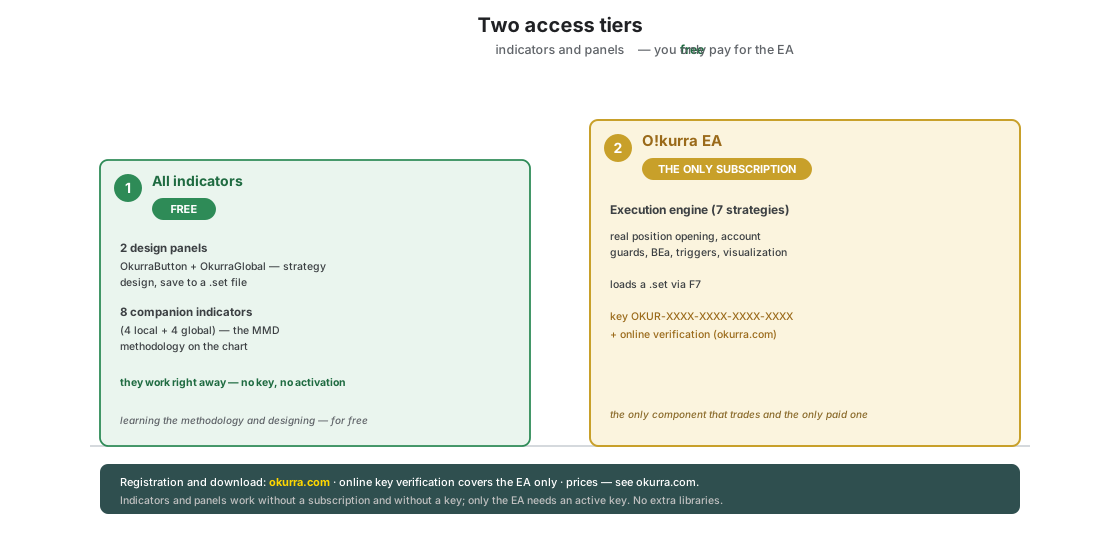
Where do I get the files? From okurra.com after registering. All the indicators — panels and companions — are free; only the EA requires a subscription (chapter 3 and section 23.7). The EA license works via a key and online verification — no additional libraries of any kind.
How do I install the files?
Copy them into the appropriate folders (MQL5\Experts\OKU\ for the EA, MQL5\Indicators\OKU\ for the indicators and panels), refresh the Navigator or restart MT5 (chapter 3).
23.2 Button configuration and the OKUR engine
How many buttons should I enable at the start? One. Start with scenario 1 (chapter 21) — one button, defaults, no filters. The goal: understand the OKUR engine. Add further buttons once you know how the first one behaves.
How many buttons are there in total? Five (B1…B5). Out of the box three are SELL (B1/B3/B5) and two are BUY (B2/B4) — chapter 4. You set each one’s direction freely.
What happened to buttons B6 and B7?
They were retired in release 2.00 — practice showed that real strategies use three to four lanes, and the reclaimed room in the parameter limit went to new mechanisms (per-button Multisize, ATR lot normalization). Old 7-button sets load normally: the B6_*/B7_* keys are skipped, a trigger target pointing at B6/B7 is cleaned, and the B1–B5 strategies work unchanged. If open positions of the former B6/B7 remain on the account, the EA warns loudly about them at startup — it no longer manages them. Migration: chapter 3.5; the alert: chapter 22.13. Need a strategy that lived on B6/B7? Move it to a free B1–B5 slot in the OkurraButton panel (Load the old set → copy the parameters into a free button → Apply → Save).
What Threshold value should I choose? The starting point is around 150 (a positive threshold for SELL, negative for BUY). Deeper thresholds = fewer signals, but from stronger extremes; shallower = more signals, some from less significant pullbacks. Calibrate iteratively (chapter 9).
What does “Active Side” mean? It defines on which side of the OKUR threshold the button watches the market. BELOW — it reacts when the oscillator is below the threshold (typically BUY); ABOVE — when above (typically SELL). The direction of extreme tracking follows from this automatically (BELOW → minimum, ABOVE → maximum). There is no longer a separate “OKUR Side” setting (chapter 9).
Movement Correction vs Movement Continuation — when to use which? Correction — you wait for a pullback of OKUR from the extreme (mean-reversion). Continuation — you wait for a further push beyond the threshold (momentum/breakout). You can enable both (the first one satisfied wins). By default the tool is set up for mean-reversion (chapter 9).
What are Signal Band and Signal Bar? Signal Band — the signal’s validity window: the first signal in the zone arms a window that closes when OKUR crosses the farther threshold (Band Exit). The band widens the area in which the signal stays valid past the zone’s threshold — it is not its edge; Band Exit must lie on the far side of the threshold, otherwise the robot works without the band. Signal Bar — whether the signal is computed from the current candle (Live, may repaint) or the closed one (Closed, stable). Both in chapter 9.6.
How do I sell only when OKUR is between 250 and −100?
From 2.05 give the zone a far edge: Direction = SELL, Active Side = BELOW, Threshold = 250, Zone Reach Enabled = yes, Zone Reach = −100. The button gives signals only between these levels; OKUR below −100 is outside the zone, also with an open band and on re-entry. A Reach on the wrong side of the threshold is switched off by the robot at startup, with a journal line. Chapter 9.4.
Can I change parameters while the EA is running?
Most — no; Inputs are loaded at startup. The exceptions are the values editable live from the panel (Daily Profit/Loss, Equity Guard, Profit Target — the Target Blocks section). For the rest: change the configuration in the panel, save a .set, load it into the EA again (F7) — or remove the EA, fix Inputs, drop it back on.
Can I use the same instrument in all five buttons? Yes — that is the essence of the tool. Five buttons on one instrument with different thresholds, filters, and directions is a diversified approach to the same market.
Can subsequent positions of a button’s grid carry a different lot than the first one?
Yes — since release 2.00 every button has its own Multisize (the Position Limits/Size section, chapter 9.9): a per-tier multiplier (>1 = each next position larger, between 0 and 1 = smaller — degression), a tier step and a lot cap. Off by default; the first position always carries the base lot.
Can the lot scale with the market’s volatility? Yes — ATR lot normalization (since 2.00, chapter 9.9): you enter a “reference ATR” in points, and the EA scales the base lot of all buttons inversely to the current ATR (a choppier market = smaller positions), within 25–400% bounds. Off by default; you set it up in the Position Management section of the OkurraGlobal panel.
I enabled ATR, but nothing changed on the chart or in the tester — what should I check?
First the “reference ATR” field — at 0 the mechanism stays inert despite the switch (the EA warns in the log). Second: normalization draws nothing on the chart — it is a lot multiplier, not an indicator, so its effect shows only in the size of the next positions. The proof that it works, in the Strategy Tester too, is the [LotATR] factor … entry in the Experts journal; compare the same set with reference 0 and with the reference set. Full description, a worked example and reference calibration — chapter 9.9 (the “Quick answers” subsection).
23.3 Filters, zones, Target Lines
Do filters increase profits? Not necessarily. Filters reduce the number of signals — sometimes for the better (fewer false ones), sometimes for the worse (they block good entries). A demo test will show whether a given filter improves your strategy (chapter 10).
Local filter or global? Local — when each button has a different filter calibration. Global — when all buttons use the same one (you configure it once in OkurraGlobal, and the buttons “subscribe” to its use). The OKUR Filter is available only as global (chapter 10).
The Activation Zone expired — what now? It stays on the chart as a reference, but no longer filters. You can delete it or “refresh” it by dragging its right edge further into the future (chapter 11). Reminder: a zone can have the shape of a channel or a line with tolerance (Zone/Line padding).
A Target Line remained after being hit — is that a bug? No. A Target Line stays by default after being touched (Keep TL after hit). When there is no position in its direction, it recolors to the “no position” color. This lets you build a ladder of multiple targets (chapter 11, scenario 4 in chapter 21).
I placed a Target Line on the wrong side of the price — what now? Drag it with the mouse to the right level, or delete it and place a new one from the panel (Target SELL/BUY).
I have ATR in three places — is that not one setting done three times? No. The name is shared because all three measure the same quantity — the width of the movement — but they use it for different things. Lot Volatility Scale (ATR) scales the position size, so the entry happens either way, only smaller or larger (chapter 9). The Volatility Gate (ATR) blocks the entry outside the band — there is no position at all (chapter 10.6a). Price Movement (ATR) converts the sensor threshold into an ATR multiple, i.e. it is only a unit of measure and blocks nothing (chapter 18). Each has its own period and its own timeframe — and that is intended: the sensor usually looks wider (M15, “what a normal move looks like today”) and the gate narrower (M1, “is something happening right now”).
Do the Volatility Gate and the Price Movement sensor fight each other? No, they complement each other. The sensor arms the button, the gate decides about the open. Example: the sensor fires on “price travelled 1× ATR in 90 seconds” — in a panic that condition is satisfied constantly. A gate with a ceiling does not block the firing (and rightly so, a firing is not an entry), but it does not allow an open while the market is running. The other direction: at night the ATR falls, so a threshold expressed in ATR falls too and the sensor starts firing on noise — the gate’s floor makes those noisy firings cost nothing.
I switched the Volatility Gate on and nothing changed — why?
Usually one of two reasons, both visible in the expert log at start-up. First: no button is opted in (the Use Global Volatility Gate (ATR) field in the button’s group). Second: both thresholds were left at 0 — the gate has no band, so there is nothing to refuse. There is also the reverse case: buttons opted in but the gate’s master switch off — then nothing happens either. The robot names each of these cases outright with an [ATRGate] WARN: … line.
Why are there fewer arrows on the chart since I switched the gate on? Because the arrows now count the gate (from OkurraButton panel 2.05). An arrow appears only where the signal passed the volatility band as well. Previously the arrows showed only what the directional filters permit — and you would see an arrow that no position followed, with nothing on the chart to explain it.
23.4 BEa and account guardians
BEa closes the basket immediately after arming — what am I doing wrong? Price was already above weighted break-even + BEa Gain at the moment of arming. Arm earlier or reduce BEa Gain (chapter 12, section 23.7).
Does BEa work on pending orders? No. BEa watches open positions only. When a pending fills, the position joins the basket and affects the weighted break-even.
What is BEa hedge mode? A mode in which BUY and SELL are counted as one net basket and closed together when the whole goes into profit. It replaced the old “Opposite Hedge Button”; whether and in which direction a button follows BEa is now decided by “Follow BEa” with a direction choice (chapter 12).
Can I scale successive BEa add-on positions? Yes — the Multisize option (chapter 12.6) scales the lots of successive booster add-ons by a multiplier every given number of positions; since release 2.00 the multiplier also accepts fractions, and values below 1 give degression (ever-smaller add-ons). Off by default. Careful with your deposit under progression: the multiple grows fast (×2 → 0.10 / 0.20 / 0.40 / 0.80…), so set a lot cap (Multisize max lot). Mind the roles (2.00): the global BEa ruler scales the true hedge; a helper adding in the protected basket’s direction uses the button’s own Multisize (chapter 9.9).
My same-side helper stopped growing from BEa Multisize after the update — why?
That is an intended change of release 2.00: in BEa mode the button’s role decides which scaling ruler applies. The global BEa Multisize ruler scales only the true hedge (add-ons opposite to the protected basket); a button adding in the direction of the basket (a grid helper) uses its own Multisize ruler from its Position Limits/Size section. To restore the old behavior: give the helper its own multiplier (plus step and cap) equal to the former BEa Multisize values. The role is visible in the journal: [Multisize] B2 BEa … vs [Multisize] B3 grid … (chapter 12.6, the migration note).
Is Equity Guard a loss guardian? No — Equity Guard watches the PROFIT side (a target or profit trailing). The basket’s loss is watched by a separate mechanism, Basket Max Loss (closes the basket and keeps playing), and the day’s loss by Daily Loss (hard stop). This is a common misunderstanding (chapter 15).
Daily Loss activates every day — what does that mean? The strategy loses more than the threshold. Options: raise the threshold (if realistic but tight), reduce the lot, change the strategy, or set the reaction to “notify” instead of “hard stop” (less recommended — the EA keeps trading). Chapter 14.
Does the daily profit limit take into account losses taken earlier the same day? Yes. Daily Profit and Daily Loss count the result from the day reset (the reset hour, default 00:00 broker time — chapter 14.2), not from the last moment with no open positions. In the default “this EA only” mode the counter is the realized result of the EA’s positions closed since the reset plus the current floating of its open positions; in “whole account” mode — the current equity minus the equity captured at reset. Earlier losses therefore stay in the counter until the end of the day, and the daily target has to make them up first. Example: Daily Profit set to 300 (account currency), three SL hits of 50 each in the morning — the counter stands at −150, so Daily Profit fires only once the EA earns 450 from that level (the counter reaches +300). The day’s reference point moves only at rollover — neither an emptied basket nor an EA restart touches it (the day’s state is stored in the platform’s shared memory). Counting “from the last zero of positions” is the basket rhythm in which Equity Guard, Profit Target and Basket Max Loss work (chapter 15). In percent mode the thresholds are also based on the equity captured at reset, not on the current equity.
What happens when I enable DPL, EG, Basket Max Loss, and PT at once? They work independently. Daily P/L Limits have the highest priority (the daily cycle); EG, PT, and Basket Max Loss operate at the basket level. The first condition met fires. This follows the philosophy of multi-layered protection (chapter 15).
Can I run two EA instances on the same symbol? Yes — preferably with different Magic bases (spacing of at least 5, chapter 9.2): then each instance’s baskets, counters, and guardians are fully separated. And if both instances share the same Magic base, the “own only” mode (Monitor Own Only, enabled by default — chapter 5.5) protects them from “poaching” each other’s positions: each instance keeps its own registry of positions it opened, and only monitors and closes those. The limit of this mode: the realized result and the daily limits (DPL) are still counted jointly per (account, Magic base) — the EA warns about this with a startup alert (also when it meets the same Magic base on a different symbol — a shared daily zero, chapter 14).
23.5 Strategies and scenarios
Does Close All stop the strategy? No. Close All closes positions but does not disable the buttons — and an enabled button still has its normal signal path and will open the next position as soon as the oscillator gives a signal. In testing that was a matter of seconds after the click. To actually stop trading: disable the buttons, or switch the EA off with the panel’s master switch (chapter 8). More on this: §9.13.
What is the difference between Movement and Price Movement? They are two different concepts that sit side by side in the panel. Movement (Correction / Continuation) is travel of the OKUR oscillator, measured in oscillator units — it decides whether an entry signal appears (chapter 9). Price Movement is travel of the price, measured in points or ATR multiples — it switches whole buttons on and off (chapter 18). In short: Movement asks how far the indicator travelled; Price Movement asks how far the price travelled.
Does a price-travel sensor open positions by itself? By default no — the sensor only switches a button on, and the button enters the normal way once it gets its signal. Every sensor does, however, have the option “the woken button enters at market at once” (chapter 18.9). Bear in mind that entering on a violent move means entering after the move, often on a wider spread.
Can a button be switched on both by Follow BEa and by a Price Movement sensor?
Yes — and there is no conflict. Every activation path — a click, Follow BEa, a sensor, triggers — presses the same button switch: first come, first served, and a repeated “switch on” for a button that is already on does nothing (in the log: (no-change), chapter 18.12). Just remember that a sensor wakes the button but does not arm the shield — until BEa arms, the helper woken early trades like an ordinary button: on its own signals, without the basket mechanics (chapter 12.9).
I woke the shield’s helper with a sensor before BEa armed — what does that change? Three things — all following from the fact that at the moment of arming the helper already has positions of its own. First, 1st hedge open on arm will still open an add-on at market on arming, but Adapted sizing will be skipped — the first hedge is tailored to the basket only when the helper has no position yet; on top of that, the Multisize tier also counts the positions opened before arming. Second, the positions from before arming join the basket (with Include in BEa basket) — too much volume on the shield’s side collected before arming can overweight the balance at once, and the zero-level guard will close the whole setup right after arming. Third, the extinguishing of boosters after a guard cut covers only the buttons the shield switched on itself — a button woken earlier by a sensor (just like one switched on manually) stays on after the cut and keeps trading with no protection behind it. So when combining the two, give the helper Deactivate when BEa is realized — it works regardless of who woke the button — and keep the lots of pre-arm entries moderate (sections 12.6 and 12.9).
Which scenario should I start with? Always with scenario 1 (one button, defaults) — regardless of experience. Complexity is added iteratively (chapter 21).
Mean-reversion or momentum? Mean-reversion (Correction) works well in ranging markets and corrections; momentum (Continuation) — in strong trends and on breakouts. By default the tool is set up for mean-reversion (chapter 9).
Does O!kurra provide a “steady income”? There is no such thing in trading. It is a research and educational tool — it shows how the market behaves through the lens of the MMD methodology and lets you experiment on demo. The result depends on configuration, calibration, risk, discipline, and market conditions. The decision about real money is yours and at your own responsibility.
Is hedging a good idea? It is one possible approach, not a universal recipe. It works in ranging markets and with mean-reversion; it does not fit strong trends (one side keeps losing) or extreme volatility (the grids grow faster than they can be realized). Consider Basket Max Loss as a safety net then (chapter 15).
23.6 Cross-button Triggers
Do I have to use triggers? No. Most strategies work great without them. By default all slots are set to “none” — and that is a good choice for a start (chapter 17).
What is the simplest trigger to try? Mutual exclusion — two alternative buttons, “one or the other” (scenario 6, chapter 21). Easy, gives an immediate effect, teaches the mechanics.
Can a trigger point at itself? No. A self-target is rejected at EA startup (a safeguard against an obvious mistake).
Loop detection keeps activating — what does that mean? You have a cycle in the trigger graph — a design problem, not a minor error. Draw the graph on paper, find the cycle, remove one trigger. Raising the thresholds is hiding the problem (chapter 17.7).
Do triggers affect open positions? No. They change only the button’s state (enabled/disabled). Open positions are still watched by the layers that took them over (SL/TP, BE, Trailing, BEa, Target Lines, guardians). Disabling a button with a trigger does not close its positions (that is a different matter than the “close positions” reaction in Stop on Opposite — chapter 13).
23.7 License and versions
How does the license work?
The license covers the EA only — all the indicators (panels and companions) are free and need no key. The EA verifies a key in the format OKUR-XXXX-XXXX-XXXX-XXXX entered in its Inputs, online (a connection to okurra.com). It requires adding https://okurra.com to the WebRequest whitelist in MT5 (chapter 3) — that is the only thing to enable on the platform side.
What happens when the subscription expires? A gentle wind-down. The EA blocks only new signals; open positions are still supervised (SL/TP/BE/Trailing/manual closing work), and the EA gradually becomes idle after the basket closes. Pending orders (entries not yet filled) are deleted; if the basket is under an armed BEa defense, the defense finishes its work and brings the basket to zero (chapter 12). It does not close positions overnight. To restore full operation — renew the subscription (chapter 3, section 23.3).
How often is the license checked? In the background, every few minutes. Short network interruptions are tolerated (grace period). A longer offline period may suspend new signals until the next successful verification.
How many accounts does the license cover / can I transfer it? It depends on the subscription version — details in your user panel on okurra.com.
How do I know I have the latest version? Current releases and version information are on okurra.com. The current versions described in this manual — release 2.05, a set of 12 tools: O!kurra EA 2.05, OkurraButton 2.16, OkurraGlobal 2.29 and the nine companion indicators: OkurraSAR, OkurraMMD, OkurraSR, OkurraOscillator, OkurraGlobalSAR and OkurraGlobalMMD at 2.02, and OkurraGlobalATR, OkurraGlobalSR and OkurraGlobalOscillator at 2.00 (2.03 added OkurraGlobalATR — the volatility-gate window). The release number is the number of the EA and of the package; the panels carry their own numbers because they change more often than the robot — a complete set from one package always fits together, and the robot warns when you load a settings file created on a newer release than itself. Every release also has a built-in expiry date (checked once a day while running): after it passes, the EA enters caretaker mode — it opens no new positions but manages open ones to their close — and the panels remind you to update and remove themselves from the chart (chapter 22.3).
Does the license key travel in .set files?
Only in full sets saved from OkurraGlobal — and only when the panel held a key in memory (a LicenseKey= line). Loading such a file via F7 overwrites the key in the EA; just paste it again. A panel without a key does not write that line; sets from OkurraButton, the factory sets and sets from the Creator do not contain it either, so they leave the key alone. Details, the sharing hygiene rule and the note on files with the (null) placeholder from before OkurraGlobal 2.04 — chapter 7.8. The key only works on the assigned MT5 account numbers anyway.
How much does it cost? All the indicators — panels and companions — are free. Only the EA is paid (subscription); pricing is described on okurra.com. The manual deliberately gives no specific amounts — check the current offer on the site.
23.8 Safety, demo, live
Is O!kurra technically safe? Yes. Network communication serves solely to verify the license key with okurra.com; the tool sends no trading or financial data.
Is it safe in the trading sense? That depends on the configuration. Wrong settings (lot too large, no Stop Loss, bad calibration) can cause significant losses. Configuration is on the user’s side — that is why we test everything on demo first.
Can I lose more than I have on the account? Theoretically yes, with heavy slippage/a gap, if the broker has no negative balance protection. Most regulated brokers offer it — check with yours.
Does O!kurra guarantee profits? No. No trading tool guarantees profits. The research-and-educational positioning is deliberate — trading real money is a risk you bear yourself.
How long should I test on demo before going live? A minimum of one week of intensive observation; the optimum is 2–4 weeks of a full market cycle. The more complex the configuration (hedge, triggers, many buttons), the longer the demo period. And once more: moving to a live account is a conscious decision at your own responsibility.
Why does the EA not manage some positions after a platform restart, even though they carry its Magic Number?
Because in “own-only” mode the robot manages only positions from its ownership registry, and the position may have been born while the robot was away (a pending filled with the platform off, an open on the built-in VPS — the robot’s files do not migrate). Since EA 1.26 such a position is detected and alerted out of the box, and the Adopt mode takes it back — see chapters 7.9 and 21.13.
Can I run the EA on my computer and on a VPS at the same time, on the same account? On one Magic Number base — no. The built-in MetaTrader VPS enforces the “one active robot at a time” rule itself (a migrated chart stops working locally); with an external VPS running a terminal copy, that discipline is on you. After every move between environments expect orphan alerts — chapter 7.9 explains how to reclaim them.
Why did my pending orders disappear after a restart? That is deliberate housekeeping: a stale pending firing days later without supervision would be more dangerous than its absence. Since 1.26 the robot notifies you about it, and chapter 7.9 covers the details (including the mode that cancels strictly the robot’s own orders).
23.9 The tool’s philosophy
Where does the name “O!kurra” come from? An original brand — it refers to the OKUR oscillator, in a light, distinctive form (with the exclamation mark). Positioned as a research and educational tool.
Why is the OKUR oscillator not described mathematically? OKUR is a proprietary methodology. The manual describes what the oscillator does and how to use it, but the algorithm remains MMD’s protected know-how. This is common practice with proprietary tools — functionality is public, the implementation protected.
Is this a tool for trading or for research? Deliberately research and educational. It serves to observe the market through the lens of the MMD methodology, to experiment with configurations, and to learn — on demo. The decision to trade for real is the trader’s conscious decision. This positioning matters both practically and philosophically: no tool can replace understanding the market and your own discipline.
Where does the MMD methodology come from? It is a set of tools and concepts by Mariusz Maciej Drozdowski (MMD) and Arkadiusz Marek Cyrzan, available under the MagicOnCharts brand (magiconcharts.com). MMD Clouds and related tools are elements of a broader ecosystem, of which O!kurra is one of the newest members. The MMD methodology has received industry recognition (including Invest Cuffs nominations). Methodology documentation — magiconcharts.com.
Will O!kurra be developed further? Yes — it is an ongoing project with development plans; subscribers receive access to newer versions.
I have a feature idea / I need support — where do I go? Through okurra.com (a multilingual chatbot based among other things on this manual, a knowledge base, contact). The methodology and other tools — magiconcharts.com.
Can I run other EAs / indicators alongside O!kurra? Yes, they will work independently. Just pay attention to unique magic numbers so they do not collide with O!kurra’s numbers (the EA uses a pool of consecutive numbers for the five buttons — chapter 8).
In the final chapter — the Glossary: an alphabetical list of terms with short definitions and references to chapters. A reference point for when, while reading, you come across a term whose meaning you want to refresh quickly.