
The MMD trend filter: the same signals, only with the trend
The first directional filter in the course — three MMD moving-average clouds split the market into three regimes and cut out signals going against the trend. See the difference between the oscillator subwindow and the chart.
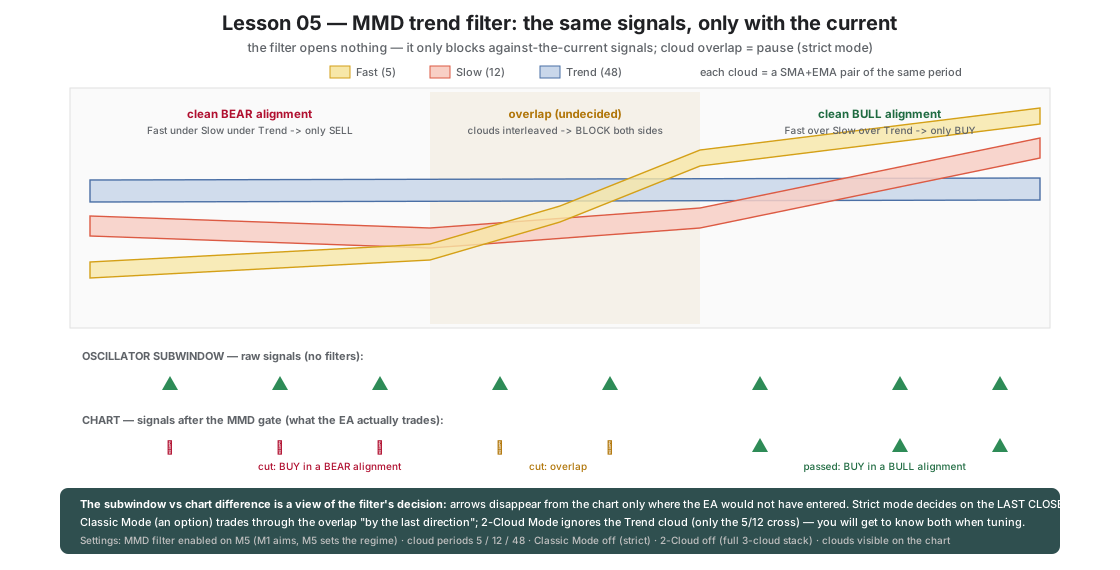
In lessons 01–04 the signals that hurt most were BUY signals caught in a strong downtrend: the stretch never came back, because it was NOT an overshoot — it was a trend. This lesson turns on the first directional filter: the MMD clouds.
MMD is three clouds of moving averages (each = an SMA+EMA pair of the same period): Fast (5), Slow (12) and Trend (48). The arrangement of the clouds describes the market regime:
- Fast above Slow above Trend → clean BULL alignment — a pass for BUY only;
- the mirrored stack → clean BEAR alignment — a pass for SELL only;
- tangled clouds (interleaving) → UNDECIDED regime — the filter blocks everything and waits for the market to declare itself.
The key rule of Okurra’s whole filter family: a filter opens nothing — it can only block a button’s signal. OKUR still generates the signals; MMD only rejects the ones going against the trend.
What is enabled and why
| Feature | Value in the set | Role |
|---|---|---|
B1_UseMMD=true | filter active, periods 5/12/48 | a directional gate on every signal |
B1_MMD_TimeFrame=M5 | clouds computed on M5, not M1 | the first step into the dimension of the timeframe: M1 aims, M5 sets the local regime — M1 clouds would ripple with the very noise they filter |
B1_MMD_TwoCloud=false | full stack of 3 clouds | the strict version: agreement of Fast, Slow and Trend at once |
B1_MMD_ClassicMode=false | strict mode (factory) | the decision comes from the last CLOSED candle; a tangle = pause (Classic Mode plays “by the last direction” through the tangle — left for later) |
B1_ShowMMD=true | clouds drawn on the chart | you see EXACTLY what the filter sees |
B1_MaxPositionsPerButton=5 | raised from 3 | the filter watches direction, so the campaign can run longer |
OKUR threshold (B1_Threshold) | returns from ±250 to a more sensitive ±150 | in lessons 01–04 the deep threshold was the only defense against noise; from this lesson the filter watches direction, so the trigger can react earlier |
| Band + limits from lesson 04 | unchanged | quantitative discipline stays |
How it makes price behavior visible
This is the most visually striking lesson of the course. Compare the oscillator window with the chart:
- In the oscillator subwindow all the arrows remain — this is the raw OKUR signal, without filters.
- On the chart the arrows thin out — only those that passed the MMD gate remain. The difference between the subwindow and the chart is literally a view of the filter’s decision.
- Hover over historical breakdowns: BUY signals in a fall that in lesson 01 cost a series of losses now disappear from the chart — the clouds were in a BEAR alignment or in a tangle.
Price moves in regimes: trends and moments of indecision. The MMD clouds translate that fact into three simple states, and the filter into one rule: play the stretch only when it returns TO the trend, not against it.
What to watch on the chart
- Arrows present in the subwindow and absent on the chart — each of them is a blocked entry; judge after the fact how many the filter cut rightly.
- Periods of cloud tangle (a ranging market) — the filter stays silent, campaigns cease.
- The moment the clouds “untangle” after a consolidation — the first passed signal often catches the start of a new swing.
One step further
Lesson 06: trend is one coordinate. The other is LEVELS — support and resistance zones the price reacts to. The SR Box filter.
B1_UseMMDB1_MMD_FastPeriodB1_MMD_SlowPeriodB1_MMD_TrendPeriodB1_MMD_TimeFrameB1_MMD_TwoCloudB1_MMD_ClassicMode
Load these in MetaTrader 5 via F7 → Load to reproduce the lesson exactly. Since release 2.04 the lesson sets switch the robot on when loaded (an orange “Trading ON from .set” bar shows under the panel title); if you switched the robot off with OFF during an earlier lesson, click ON in the panel's top row — the next set does not undo your click. Available to signed-in users with an active licence.
Educational material, not investment advice. The sets are teaching examples — before any live use, test on real ticks and tune to your own account. Reference deposit 1000 in account currency, lot 0.01; scale money values proportionally to your balance.