
Higher-timeframe consent: global filters on M15
The M1 button asks two M15 instances for consent — the Global MMD trend and the Global OKUR extremes veto. Decision model: M1 aims, M15 grants consent.
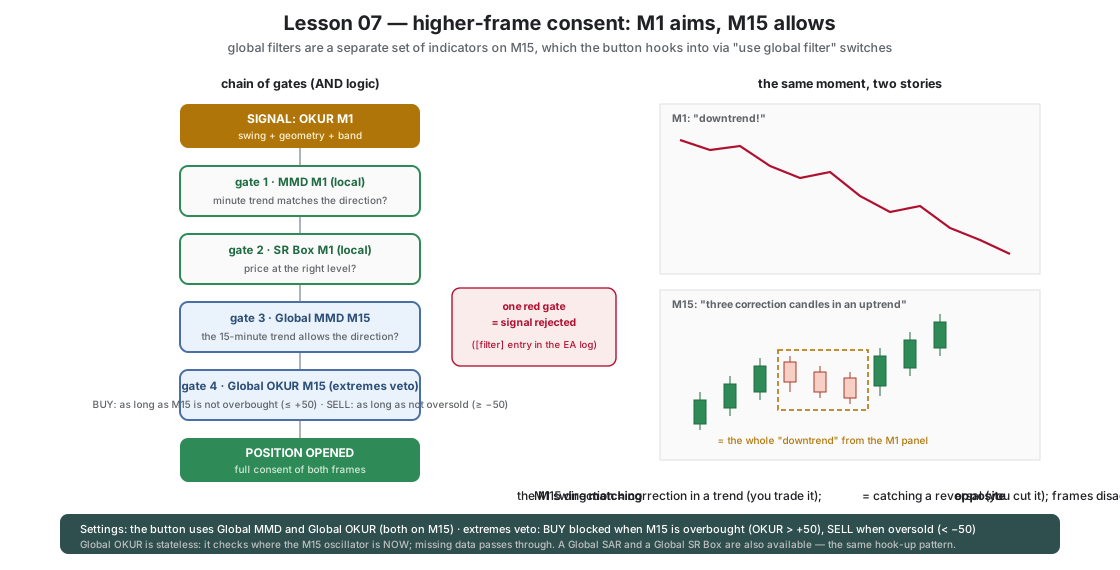
Everything we have built so far looks at the market through the M1 frame. But a one-minute trend is sometimes only a correction inside a fifteen-minute trend — and the other way around. Okurra solves this with global filters: a separate set of parameters (SAR / MMD / SR / OKUR) usually computed on a higher timeframe, to which any button can subscribe with a single switch B*_UseGlobal*.
In this set the M1 button asks two M15 instances for consent:
- Global MMD (M15, 5/12/48) — does the fifteen-minute trend even allow my direction?
- Global OKUR (M15) — extremes veto — is the higher frame not already “overheated”? A BUY on M1 passes as long as OKUR M15 does not exceed +50 (the fifteen-minute market is not overbought); a SELL — as long as it does not fall below −50 (not oversold). A methodological note: if you set the classic zones here (“BUY only at M15 oversold”), the filter would clash with the trend-following Global MMD (an M15 uptrend rarely coexists with M15 oversold) and the chain of gates would throttle almost every entry — the two higher-frame filters must COMBINE, not exclude each other.
The decision model from this lesson on reads: M1 aims, M15 grants consent.
What is switched on, and why
| Feature | Value in the set | Role |
|---|---|---|
B1_UseGlobalMMD=true | Global MMD M15 (factory 5/12/48) | higher-frame trend consent |
B1_UseGlobalOKUR=true | extremes veto: BUY while OKUR M15 ≤ +50, SELL while ≥ −50 (open zones) | the higher frame can veto an entry into an overheated market |
Global_ShowMMDOnChart=true, Global_ShowOKUROnChart=true | global overlays visible | you tell the M15 clouds (global) apart from the M1 clouds (per-button) |
| Local filters from lessons 05–06 | MMD unchanged; SR returns to avoid mode | the full AND chain: OKUR M1 → MMD M1 → SR M1 → MMD M15 → OKUR M15 |
Why does SR return to avoid mode? Reaction mode (lesson 06) is very selective in itself — multiplied by M15 consent it throttles the chain of gates so far that there are practically no entries (verified on the tester with real ticks). This is the general rule of stacking filters: each further gate multiplies selectivity — the sharpest mode of one layer rarely agrees with the following layers. Reaction mode stays a research tool from lesson 06.
The global OKUR filter is stateless — it simply checks where the M15 oscillator sits at this moment. Missing data (e.g. just after start) passes, it does not block.
How it makes price behavior visible
- Fractality. The same chart tells different stories on M1 and M15. The M15 cloud overlay on the M1 chart shows this without words: what looks like a downtrend on M1 is sometimes three candles of correction on M15.
- Correction vs reversal. An M1 stretch aligned with the M15 direction is usually a correction within the trend — the healthiest setup of this course. An M1 stretch against M15 is an attempt to catch a reversal — and that is exactly what this set cuts out.
- Silence as information. When M1 and M15 disagree, the set does not trade. You will see whole hours with no trades — this is not a malfunction, it is the definition of the edge: we play only when both frames say the same thing.
What to watch on the chart
- Signals cut solely by the M15 frame (the local filters passed them) — compare their fate with the trades that got full consent.
- The M15 clouds against the M1 clouds — the moments when both frames storm the same way are the windows of the highest effectiveness.
- The
[filter]entries in the EA log — you see exactly which gate rejected a signal.
Next step
Lesson 08: the higher frame can also change its mind DURING a campaign. What then? Reacting to the opposite signal — Stop on Opposite.
B1_UseGlobalMMDB1_UseGlobalOKURGlobal_MMD_TimeFrameGlobal_OKUR_TimeFrameGlobal_OKUR_BuyThresholdGlobal_OKUR_SellThresholdGlobal_OKUR_BuySideGlobal_OKUR_SellSideGlobal_OKUR_BuyReachOpenGlobal_OKUR_SellReachOpen
Load these in MetaTrader 5 via F7 → Load to reproduce the lesson exactly. Since release 2.04 the lesson sets switch the robot on when loaded (an orange “Trading ON from .set” bar shows under the panel title); if you switched the robot off with OFF during an earlier lesson, click ON in the panel's top row — the next set does not undo your click. Available to signed-in users with an active licence.
Educational material, not investment advice. The sets are teaching examples — before any live use, test on real ticks and tune to your own account. Reference deposit 1000 in account currency, lot 0.01; scale money values proportionally to your balance.