
Time and failure: Trading Hours + T. on Server
The session schedule decides WHEN the EA looks for entries, and stops pushed out to the broker's server decide WHO watches them when the VPS, the connection or the terminal goes down.
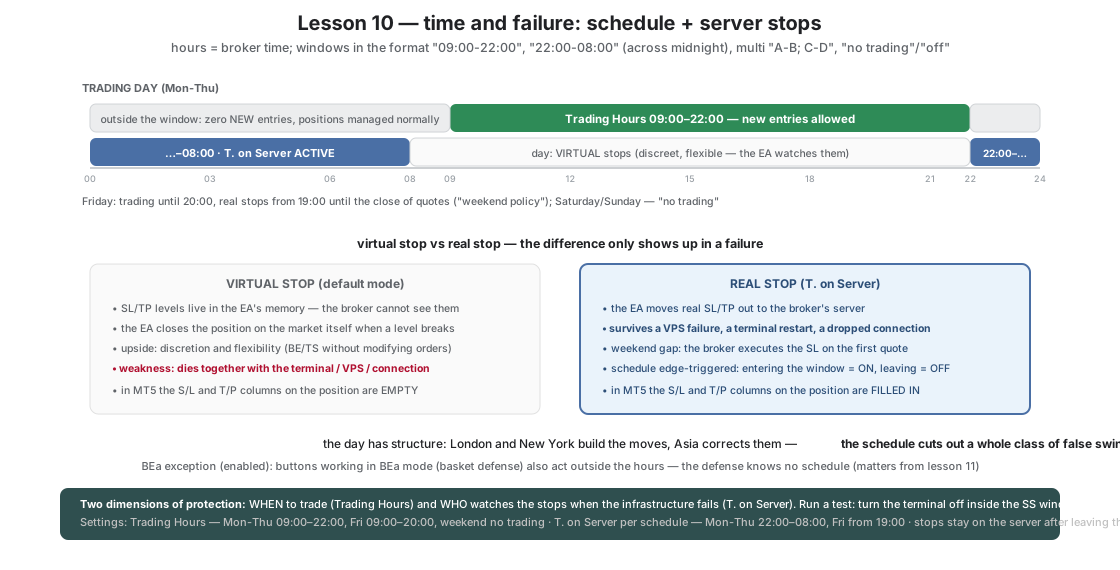
Two features, one common denominator: the market is not the same around the clock, and your infrastructure is not reliable.
- Trading Hours (TH) — a session schedule. Outside the window the EA generates no NEW entries, but manages existing positions normally (BE, TS, reactions all work). A button enabled outside the hours waits “asleep” and starts when the window opens.
- T. on Server (SS) — moving the stops out to the broker. By default SL/TP in Okurra are virtual (the broker does not see them — the EA closes the positions on the market itself). This gives discretion and flexibility, but has a weak point: it dies together with the terminal. Server Stops mode pushes REAL SL/TP to the broker’s server — the protection will survive a VPS failure, a dropped connection and a terminal restart. The SS schedule switches the mode automatically in the given windows.
The hours in the set = BROKER time — match the windows to your account’s server.
What is enabled and why
| Feature | Value in the set | Role |
|---|---|---|
TH_Enabled=true, Mon–Thu 09:00-22:00, Fri 09:00-20:00, weekend “no trading” | trading during the liquid EU+US hours | we skip the Asian quiet, the rollover and the Friday evening |
TH_ExcludeBEaMode=true (factory) | buttons in BEa mode work outside the window too | basket defense knows no working hours (important from lesson 11) |
SS_ScheduleEnabled=true, Mon–Thu 22:00-08:00 | real stops FOR THE NIGHT | you sleep — the broker watches |
SS_Fri=19:00-23:59 | real stops before the weekend | the weekend gap with a real SL instead of a virtual one |
SS_KeepServerStopsOnOff=true (factory) | stops stay on the server after leaving the window | a mode change removes nothing at the wrong moment |
| The whole stack from lesson 09 | unchanged | capital protection works in both regimes |
The windows use one format: "08:00-22:00", "22:00-08:00" (across midnight), multi "A-B; C-D", "no trading"/"off".
How it makes price behavior visible
- The day has a structure. After a week with TH, compare the markers with the previous lessons: a whole class of trades from 0:00–9:00 disappears — a thin market, wide spreads, false stretches. XAUUSD volatility is a function of the clock: London and New York build the moves, Asia corrects them.
- Virtual vs real stop. Run a test: turn off the terminal while SS is active — the position still has an SL/TP at the broker (visible in MT5 next to the position). Turn it off outside the SS window — the levels disappear from the broker’s view, they exist only in the EA. That difference is the definition of operational risk.
- The weekend gap. The Friday SS window shows what a real stop is for: Monday’s opening price can jump over a virtual level by dozens of points — the broker executes a real SL on the first quote, while nobody would watch a virtual one if the VPS did not come back up.
What to watch
- The EA panel: TH status (window open/closed) and the
T. on Serverbutton switching at 22:00 and 08:00. - Positions in MT5: the S/L and T/P columns empty (virtual mode) vs filled (server mode).
- The behavior of a button enabled outside the hours — a sleep entry in the log and a start when the window opens.
Next step
Lesson 11: Okurra’s most distinctive mechanism — the BEa shield, which walks the whole basket “to even” instead of closing it in panic.
TH_EnabledTH_MonTH_TueTH_WedTH_ThuTH_FriTH_SatTH_SunTH_ExcludeBEaModeSS_DefaultOnSS_ScheduleEnabledSS_MonSS_TueSS_WedSS_ThuSS_FriSS_SatSS_SunSS_KeepServerStopsOnOffGlobal_VirtualSLGlobal_VirtualTP
Load these in MetaTrader 5 via F7 → Load to reproduce the lesson exactly. Since release 2.04 the lesson sets switch the robot on when loaded (an orange “Trading ON from .set” bar shows under the panel title); if you switched the robot off with OFF during an earlier lesson, click ON in the panel's top row — the next set does not undo your click. Available to signed-in users with an active licence.
Educational material, not investment advice. The sets are teaching examples — before any live use, test on real ticks and tune to your own account. Reference deposit 1000 in account currency, lot 0.01; scale money values proportionally to your balance.